

One powerful (and often overlooked) way to make your website more helpful, more professional, and more visible in search results is by adding a well-thought-out FAQ section - especially for complementary therapists.
What's the Benefit of Adding an FAQ?
It Answers Client Questions Before They Ask
Potential clients often visit your website with questions like:
"How many sessions will I need?"
"Is this treatment suitable for anxiety?"
"Do you offer online appointments?"
By answering these common questions directly on your site, you reduce uncertainty and make people feel more at ease - which is especially important in the world of wellness and therapy.
It's Great for SEO
Google loves clear, concise content that answers specific questions. FAQ sections can help your site appear in featured snippets or "People Also Ask" results. Each question is a chance to rank for a long-tail keyword someone might be typing into Google.
It Reduces Repetitive Enquiries
Instead of answering the same questions over and over by email or phone, a good FAQ helps clients help themselves. It saves you time while showing that you're thoughtful and prepared.
You Can Add Multiple FAQ Sections
Got different services or therapies? You can add specific FAQs to each page - for example, one set for Reiki, another for Counselling, and another for Online Sessions. It keeps things relevant and user-friendly.
Boost Your Website's Visibility with Built-In Schema Support
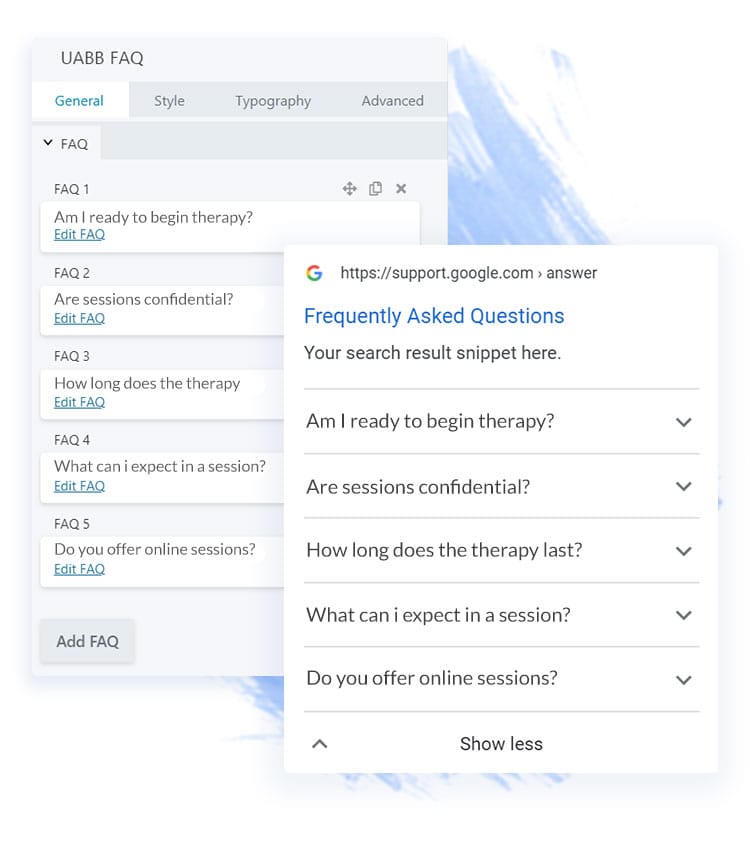
The FAQ module doesn't just look great - it also helps your site get noticed by Google. When you add FAQs using this module, it automatically includes the right schema markup behind the scenes. That means your answers have a better chance of showing up as rich snippets in search results.
If someone searches for a question you've included in your FAQ - like "Are therapy sessions confidential?" - your site could appear higher in the results, with the answer shown right there. It's a simple, effective way to improve visibility and attract more of the right visitors to your site.
Step-by-Step Guide to Adding an FAQ
- Open the page in Beaver Builder
Click "Page Builder" from the top bar of your WordPress dashboard when viewing the page. - Drag in the UABB FAQ Module
Look for "FAQ" in the modules panel (make sure you're using the Ultimate Addons modules). Drag it to where you want your FAQs to appear. - Add Questions and Answers
You'll see an option to add as many FAQs as you like. Type your question, then fill in the answer box. You can even use formatting and links. - Choose Layout Style
Toggle between Accordion or Grid view - accordion is great for mobile users and keeps the layout compact. - Style It to Match Your Website
You can easily change the colours, fonts, spacing, and icons to match your branding. - Save and Publish
Once you're happy with it, save and publish your changes. Done!
Example: How Your FAQ Could Look on Your Website
Below is a live example of a FAQ section using the UABB module. You can have one just like this on your own site - with your own questions and answers tailored to your therapy style and clients.
Final Thoughts
Adding FAQs isn't just about filling space - it's about creating trust, clarity, and a better client experience. Whether you're answering questions about treatments, pricing, online sessions, or how to prepare, a good FAQ section makes your site feel alive, cared for, and client-centred.
If you're a HealthHosts client and want to add or edit an FAQ section, we're always happy to do this for you or guide you through it - just let us know!